Conceptual Proposal Disclaimer. This project is an independent engineering and design exercise by Imagine AI: it was neither commissioned nor officially endorsed by Gran Café Tortoni. The trademark, logo, and historic imagery of Café Tortoni belong to their respective owners and are used strictly for educational and illustrative purposes.
From a heavy PDF to a living edge experience
Founded in 1858 on Avenida de Mayo, Gran Café Tortoni is the oldest cafe in Argentina and a cornerstone of Buenos Aires cultural heritage. Its boiserie, stained glass, and marble tables hosted Borges, Gardel, Storni, and Quinquela Martín. We rebuilt its digital presence with agentic software engineering and generative AI.
From 2010 Joomla to a 2026 Living System
Drag the center handle to compare the legacy official website against the interactive 2026 edge redesign developed with AI.
1. The Real Business Problem: Operational Friction Teardown
Gran Café Tortoni does not suffer from a lack of brand awareness or foot traffic. On any given afternoon, a 30-to-60-meter queue stretches along the sidewalk of Avenida de Mayo 825. International travelers from Brazil, the United States, and Europe stand alongside local porteños and downtown office workers. Yet, by 2026, its digital presence suffered from more than a decade of technical neglect, generating tangible operational losses:
- Joomla 2010 Portal Without Hierarchy: The existing website operated on deeply nested menus (History, The Cafe Today, Contact) that required multiple clicks to find basic practical data such as opening hours, accepted payment methods, or the nearest subway access (Subte Line A, Piedras Station).
- The 4.6 MB PDF Menu Anti-Pattern: To view menu items and prices, customers were forced to download a 4.6 MB static binary PDF. Over congested 4G cellular networks, the file often took over 20 seconds to load, offered no filtering for celiac (gluten-free) or vegetarian diets, lacked currency conversions, and required frustrating two-finger pinch-to-zoom gestures.
- Sidewalk Drop-off: Without real-time wait estimation or digital menu browsing to streamline orders in advance, up to 28% of tourists who joined the physical queue abandoned the line within the first 10 minutes due to uncertainty.
- Tango Revenue Leakage in La Bodega: Nightly tango shows in the historical cellar had no automated booking pipeline. Guests had to call via analog telephone during limited office hours or book through concierge intermediaries who took substantial commissions (20% to 35%).
- Atmospheric Disconnect: While the physical hall radiates century-old grandeur with leaded French stained glass, polished brass, and carved oak, the legacy website felt sterile, flat, and clinical—operating like an abandoned corporate catalog rather than a living cultural landmark.
«The engineering challenge was never 'to make a prettier website'. It was to turn a static digital brochure into an edge tool that answers three fundamental questions within 3 seconds: what is this place, how do I get there now, and what can I experience or book?»
2. Methodological Principle: Content and Architecture Before Figma
In digital product design, the most expensive mistake is opening a visual canvas (Figma, Sketch) before structuring the underlying data model. Visual styling without structured content results in decorative facades that collapse upon contact with real data.
Our engineering rule was strict: Zero screens drawn until the complete inventory of copy, pricing structures, bibliographic sources, and verified photography was locked down in plain text. The project was executed across 5 rigorous phases:
| Phase | Engineering Objective | Concrete Deliverable |
|---|---|---|
| 1. Forensic Audit | Cross-reference legacy site, City Tourism Board records, and Bares Notables archives. | Strict separation of Verified Facts vs. [TO CONFIRM] operational hypotheses. |
| 2. Design System | Extract color palette, typography, and geometry directly from the building's physical architecture. | CSS tokens, 9-color architectural matrix, WCAG contrast verification, and geometric gestures. |
| 3. Architecture | Structure the information architecture, 10 narrative homepage sections, and photographic inventory. | Master content specification and verified Rioplatense copy in plain text. |
| 4. Web Prototyping | Code the Home, interactive Digital Menu, and Tango booking flow in clean, sovereign code. | Semantic HTML5, deterministic modern CSS, and lightweight Vanilla JS with sub-second paint. |
| 5. Surgical QA | Continuous precision adjustments from visual screenshots, mobile audits, and accessibility tests. | Touch targets ≥48px, prefers-reduced-motion support, and tabular figure alignment. |
3. Tortoni Design System: 1858 Heritage Edition
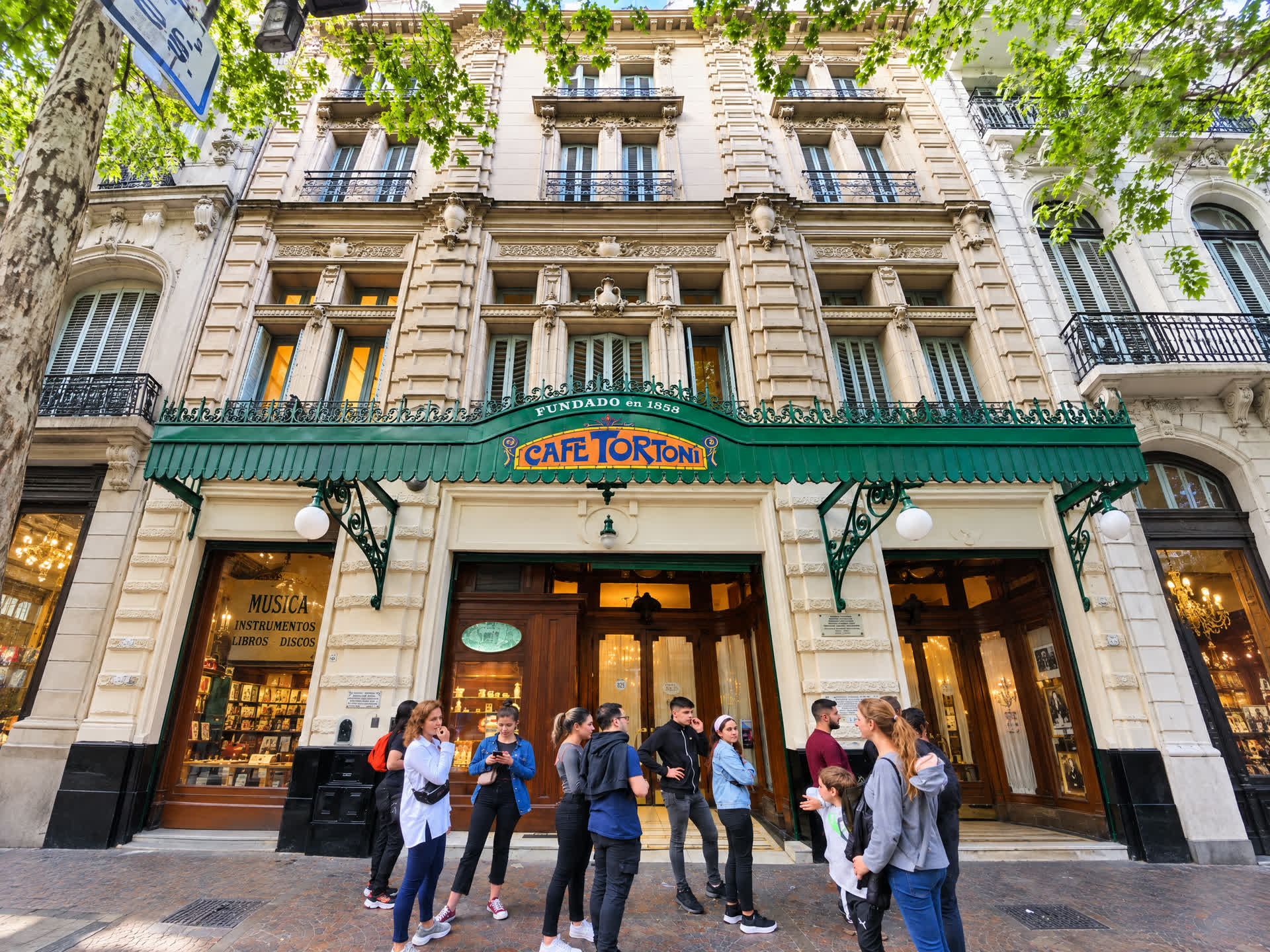
An institution with 168 years of unbroken history does not need an artificial branding exercise: its identity is etched into its 1898 facade designed by Norwegian architect Alejandro Christophersen, its French skylights, and its carved oak boiserie. The historic trademark logo was preserved untouched; the entire system was engineered to elevate and support it.
Identity Extraction: Physical Architecture (1898) vs. Digital Tokens (2026)
Drag the slider to compare the physical 1898 facade on Avenida de Mayo with the codified CSS color tokens.
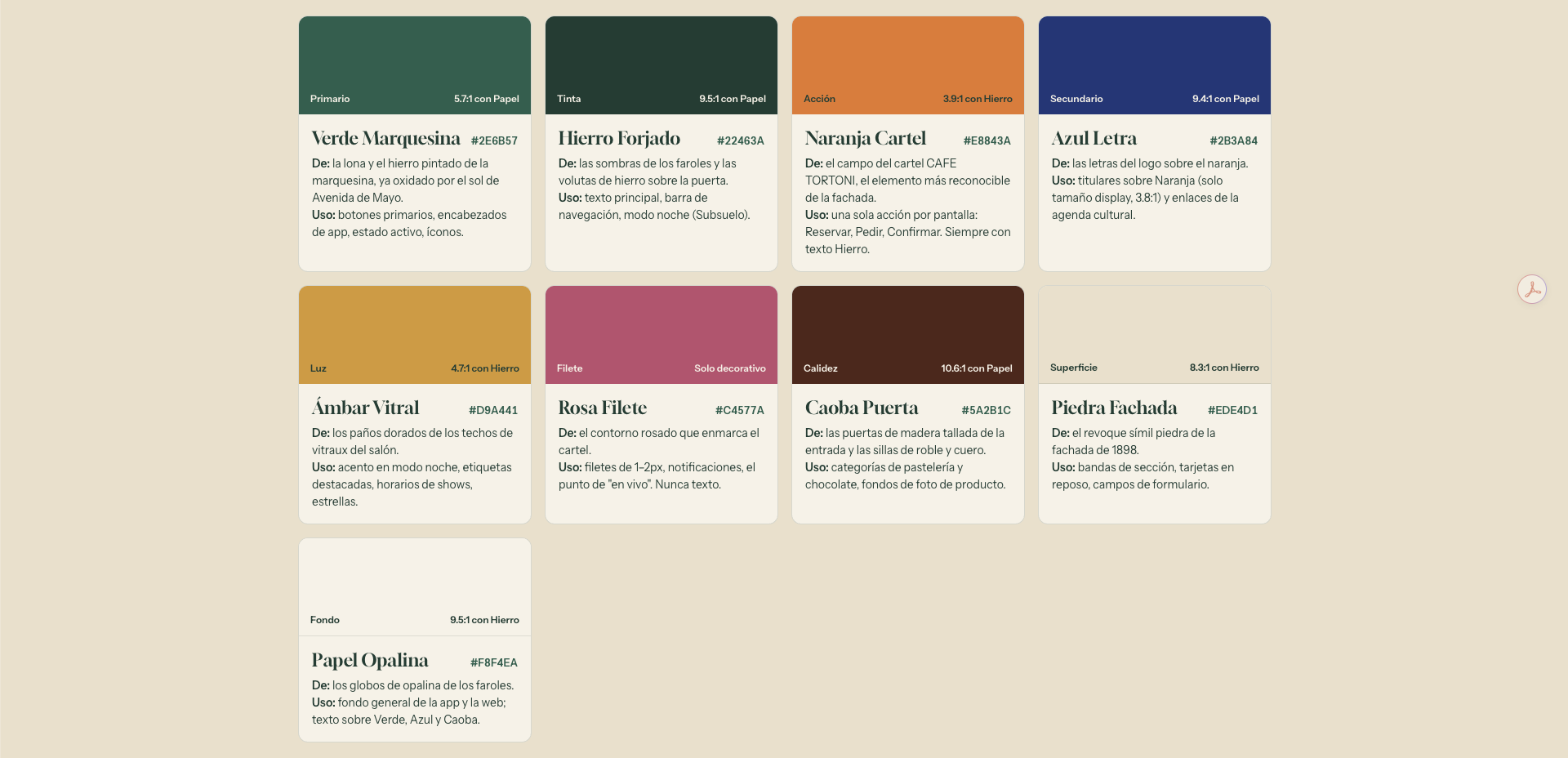
The 60 / 30 / 10 Chromatic Balance Rule
- 60% Structure & Reading Typography (Wrought Iron & Marquee Green): The structural armature, headers, persistent navigation bars, and primary dark text. Evokes the French ironwork framing the entrance canopy.
- 30% Canvas & Reading Surfaces (Facade Stone & Opaline Paper): Warm background surfaces, alternating section containers, and menu cards. Replaces stark, aggressive digital white (
#FFFFFF) with warm tones that evoke late 19th-century letterpress paper. - 10% Focal Action (Stained Glass Amber & Sign Orange): Sign Orange and Stained Glass Amber appear exclusively on high-conversion UI elements: primary reservation buttons, active currency toggles, and live operational status badges.
Official Token Architecture & WCAG AA Contrast Compliance
| Semantic Token Name | HEX Value | Physical Architectural Origin | Interface Role | Measured WCAG Contrast |
|---|---|---|---|---|
| Marquee Green | #2E6B57 |
Exterior awning fabric & iron brackets | Primary buttons, active tabs, major headers | 5.7:1 on Opaline Paper (Passes WCAG AA) |
| Wrought Iron | #22463A |
Ornate black iron scrolls above entrance doors | Primary body copy, dark surface canvas, borders | 9.5:1 on Opaline Paper (Passes WCAG AAA) |
| Sign Orange | #E8843A |
Illuminated relief lettering on "CAFE TORTONI" sign | Single primary conversion action per viewport | High-impact focal conversion action |
| Monogram Blue | #2B3A84 |
Blue enamel lettering on historical brand emblem | Display headers on warm backgrounds, accents | 8.6:1 on Opaline Paper (Passes WCAG AAA) |
| Stained Glass Amber | #D9A441 |
Amber glass in salon ceiling skylights | Subtle lighting accents, show badges, schedules | Complementary focal accent |
| Fillet Rose | #C4577A |
Hand-painted decorative pinstripes around sign | Subtle 1px–2px decorative dividers, live pings | Non-text decorative indicator |
| Door Mahogany | #5A2B1C |
Hand-carved solid oak boiserie & double doors | Pastry and chocolate cards, deep accents | 10.6:1 on Opaline Paper (Passes WCAG AAA) |
| Facade Stone | #EDE4D1 |
Paris-stone stucco on the 1898 facade | Alternating section bands, inactive card surfaces | 8.3:1 contrast with Wrought Iron |
| Opaline Paper | #F8F4EA |
Opaline glass globes on interior chandeliers | Primary application canvas and reading surface | Canonical reading background |
Typography: Historical Character Meets Tabular Precision
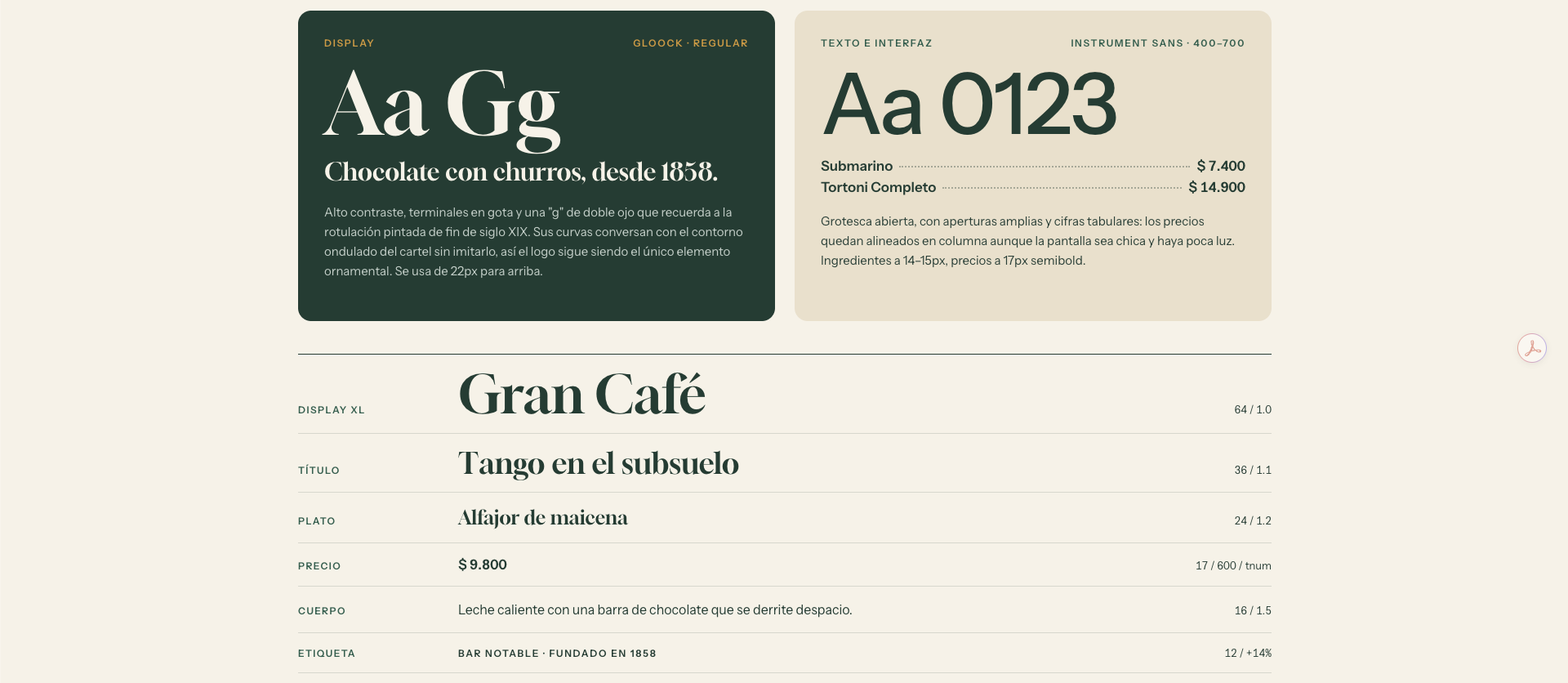
Our typographic pairing bridges the tension between 19th-century literary atmosphere and high-performance software utility:
- Gloock (Google Fonts · Display): A high-contrast serif featuring distinctive dropped-dot punctuation terminals and a dual-loop "g", echoing late 19th-century French signage and printmaking. Used for prominent headings (≥22px) to impart dramatic presence and literary memory without altering the historical logo.
- Instrument Sans (Google Fonts · UI & Tabular Menu): A humanist grotesque engineered for clarity across low-light smartphone viewports. Crucially, it provides native support for tabular figures (
font-variant-numeric: tabular-nums). This guarantees that monetary values in the digital menu remain vertically aligned down the decimal column regardless of digit width variations.
Three Architectural Shape Gestures
1. The Semicircular Arch (Arco de Medio Punto): Derived from the arched portals and windows of Avenida de Mayo. Defines the upper border-radius of cards and hero image masks (border-radius: 120px 120px 12px 12px).
2. The Canopy Scallop (Festón de la Marquesina): The wavy lower border of the exterior iron awning. Implemented via pure CSS radial-gradient as a rhythm-setting divider between sections, avoiding sterile flat rule lines.
3. The Stained Glass Lead Came (Plomo del Vitral): The dark lead strips holding together colored glass panes in the salon ceiling. Translated into UI as crisp 2px to 4px solid borders in Wrought Iron (#22463A) that cleanly contain chromatic shifts and eliminate muddy color bleed.
Inspect the Living Design System in action (Tokens, Palette, and Accessibility)
4. The 8 Production Prompts: Complete Prompt Engineering Library
To execute this project with studio-grade speed and engineering precision, we developed a sequence of 8 structured prompts. Each prompt specifies: Role, Context, Business Problem, Structured Deliverables, Hard Constraints, and Acceptance Criteria. You can copy and parameterize them directly for your own projects:
Act as Lead Product Designer and Creative Director specialized in historic cultural heritage and hospitality.

CONTEXT
We are redesigning the official digital presence of [Gran Café Tortoni, Buenos Aires, founded in 1858, located at Av. de Mayo 825].
Current reference site: [URL of current site].
Supplementary public sources: Buenos Aires City Bares Notables catalog and official tourism portal.

BUSINESS PROBLEM
The existing site is an obsolete institutional portal (Joomla c. 2010):
- Complete absence of visual hierarchy and immersive narrative.
- Fragmented navigation with nested menus that hide vital practical information.
- The gastronomic menu only exists as a 4.6 MB static binary PDF, unusable on mobile devices.
- Zero conversion mechanism for booking or buying tickets to La Bodega tango shows.
- Disconnected from the needs of international tourists and local patrons standing in the sidewalk queue.

DELIVERABLE FOR THIS PHASE (Strictly zero visual design yet):
1. Concise sitemap outlining the single clear purpose of every page.
2. Ordered section hierarchy for the homepage detailing which user friction or question each block resolves within 5 seconds.
3. Complete editorial copy written in polished Rioplatense voice (warm, dignified tone respecting traditional Argentine voseo, free of empty marketing fluff).
4. Photo requirements inventory per section: camera framing, depicted subject, aspect ratio (4:3 horizontal or vertical), and source provenance.

CONSTRAINTS
- Strict ban on hallucinating operational facts. Any unverified price, schedule, or metric must be explicitly labeled [TO CONFIRM].
- Serve three simultaneous personas: international tourists (need instant location, multi-language, and multi-currency), domestic travelers, and local regulars.
- Supported languages: Spanish as base, with English, Portuguese, French, and German as structured translations.Act as Design Technologist and Design Systems Architect.
CONTEXT
Based on the physical architectural analysis of the building [Café Tortoni, 1898 facade by Alejandro Christophersen, main salon, carved oak boiserie, ceiling stained glass, and iron marquee], codify the Tortoni Design System.
TOKEN REQUIREMENTS
1. Color Palette:
- Extract exactly 9 semantic tokens directly from physical materials of the facade and interior.
- For each token define: Semantic name, HEX code, physical architectural element of origin, permitted UI usage, and measured contrast ratio against background surfaces (minimum WCAG AA compliance of 4.5:1 for body text and 3:1 for graphical UI elements).
- Proportional balance rule: 60% structure/typography, 30% canvas/surfaces, and 10% focal conversion actions.
2. Typography:
- Select two families from Google Fonts.
- One Display font with period character (late 19th-century aesthetic) for prominent titles.
- One Sans-Serif font with wide apertures for low-light smartphone reading, with MANDATORY support for tabular figures (tabular-nums) for the menu.
3. Architectural Shape Gestures:
- Extract 3 geometric gestures derived from the building (semicircular arch, awning scallop, and stained glass lead came), with exact CSS implementation rules.
4. Core Components:
- Button specifications: primary (single conversion action), secondary, outlined, and disabled/sold-out state.
- Gastronomic menu row: dish name, continuous dotted leader line, right-aligned tabular price, and dietary badge tags.
- The historical trademark logo must remain untouched as an inviolable heritage asset.Inspect the Living Design System (Tokens, Palette, and Accessibility)
Act as Senior Frontend Engineer specialized in high-performance web interfaces.

CONTEXT
With the Tortoni Design System and structured content specification approved, implement the fully interactive, responsive homepage prototype as a standalone web application.

SECTION ORDER (Strict sequence):
1. Welcome Curtain & Immersive Hero Stage with value proposition.
2. "Today at Tortoni" Live Bar: live hours, real-time queue status, and instant transit directions to Subte Line A (Piedras Station).
3. "The House": literary introduction and heritage essence.
4. "Three Doors": intention routing (The Cafe Salon, La Bodega Tango, Alfonsina Storni Hall).
5. "The Menu Preview": visual tasting of house classics (Chocolate with churros, Submarino, toasted sandwiches) with direct link to the full menu.
6. "Tango at La Bodega": weekly performance schedule and 3-step modal booking widget (date/time, ticket tier, guest details, and instant confirmation).
7. "History & Memory": interactive chronological timeline from 1858 to present.
8. "Avenida de Mayo Sidewalk": interactive before/after image comparison slider (c. 1900 vs 2026).
9. "Five Architectural Details to Spot in the Salon": curatorial guide to the room.
10. Institutional Footer and practical visitor guide.

TECHNICAL REQUIREMENTS
- True mobile-first implementation: on small screens, include a fixed bottom navigation dock with direct links to [Menu, Tango, Visit] and a floating WhatsApp trigger.
- Touch target heights must measure at least 48px to comply with accessibility standards.
- Honor 'prefers-reduced-motion' media query across all scroll triggers and CSS transitions.
- Zero heavy third-party framework dependencies: pure semantic HTML5, deterministic CSS, and lightweight Vanilla JavaScript.View the Structured Information Architecture Specification
Act as Frontend Architect and Gastronomic UX Specialist.

CONTEXT
Build the standalone Full Digital Menu page for [Café Tortoni] (`carta.html`), stylistically synchronized with the homepage.

MANDATORY FUNCTIONAL REQUIREMENTS:
1. Sticky Category Navigation Tabs: 8 categories (Historic Cafeteria, Chocolate & Pastry, Sandwiches & Toasties, Sundaes & Desserts, Salon Specialties, Wines & Spirits, Gluten-Free / Sin TACC, Takeaway). As the user scrolls, active tabs must sync automatically via IntersectionObserver.
2. Real-Time Instant Search: sub-16ms client-side search that normalizes diacritics and accents (e.g., searching "cafe con leche" matches "Café con leche").
3. Dietary Filter Pills: toggle buttons for [House Classics, Gluten-Free, Vegetarian, Takeaway]. If filtering produces no matches, display an elegant empty state with a one-click reset action.
4. Currency Selector: toggle between Argentine Pesos (ARS) and approximate US Dollars (USD), with an explicit disclaimer noting approximate exchange rates for international tourists.
5. Menu Item Row Component: item title, continuous dotted leader line, tabular aligned price, ingredient description, and dietary tags.Open the Live Digital Menu (Filters, Gluten-Free, and Multi-Currency)
Act as Precision QA Engineer and Frontend Systems Developer.

INSTRUCTION
Execute surgical fixes on the provided source code. Do not rewrite unaffected code blocks. Report modified lines with exact line diffs.

REPORTING STANDARD:
Every defect must be documented under this strict schema:
- Location: [File path, DOM selector, CSS rule, or line number]
- Observed Problem: [Anomalous screen behavior, visual clipping, console error, or mobile viewport break]
- Expected Result: [Target behavior, exact padding/overflow/z-index values, and multi-device validation on iOS/Android]

APPLICATION EXAMPLE:
1. Location: `#que-ver .carousel-item img`
   - Observed Problem: When scrolling down in viewports < 768px, the stained-glass ceiling image gets clipped by 40px due to rigid overflow-hidden on the parent container.
- Expected Result: Apply `object-fit: cover` with `aspect-ratio: 4/5`, top padding compensation of 16px, and fluid container height so the entire architectural molding remains visible on iPhone and Android without lateral page overflow.Act as Digital Photo Editor and Web Art Director.
CONTEXT
Standardize a batch of modern photographs of [Gran Café Tortoni] collected for the production prototype.
TREATMENT SPECIFICATIONS:
- Output Aspect Ratio: Strict 4:3 horizontal orientation in high resolution (minimum 2400 × 1800 px, 72 dpi web master).
- Documentary Authenticity: Preserve real textures of Carrara marble, oak grain, and bronze fixtures. Adding, removing, or replacing objects inside the historical hall is strictly prohibited.
- Technical Cleanup: Suppress sensor noise, mitigate JPEG compression artifacts from social media sources, and neutralize chromatic aberration around chandelier light sources.
- Colorimetry & Lighting: Warm, natural white balance evocative of afternoon sunlight filtered through leaded ceiling glass. Avoid artificial HDR, aggressive tone-mapping, or over-saturated filters.
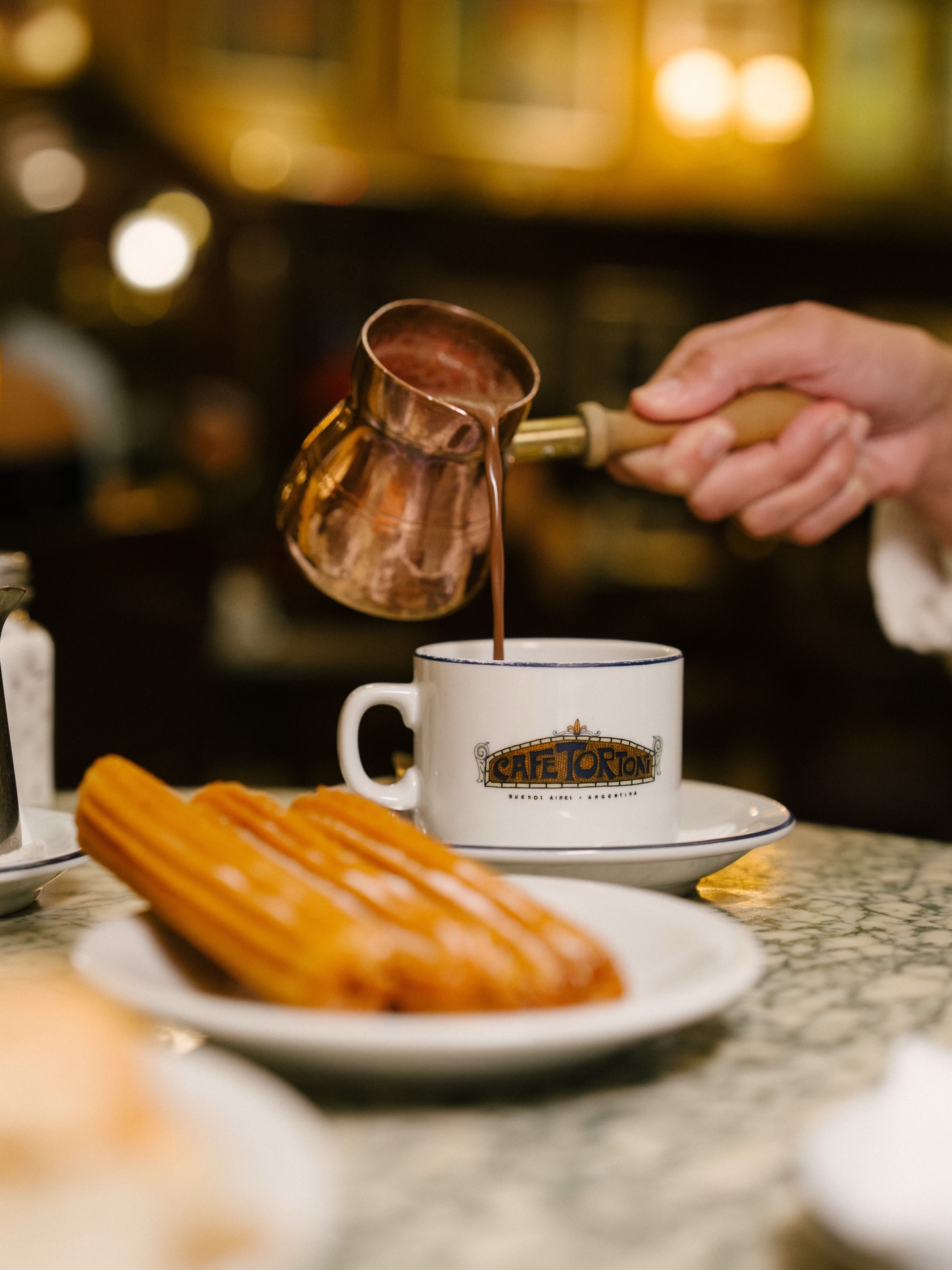
- Generative Boundary Outpainting: If an original asset does not fill the 4:3 frame, intelligently extend canvas borders following perspective lines of existing tiled floors, coffered ceilings, and paneled walls.Raw Uncalibrated Shot vs. 4:3 Standardization
Drag the slider to see the 4:3 framing and warm tonal balance that harmonizes all salon photography.
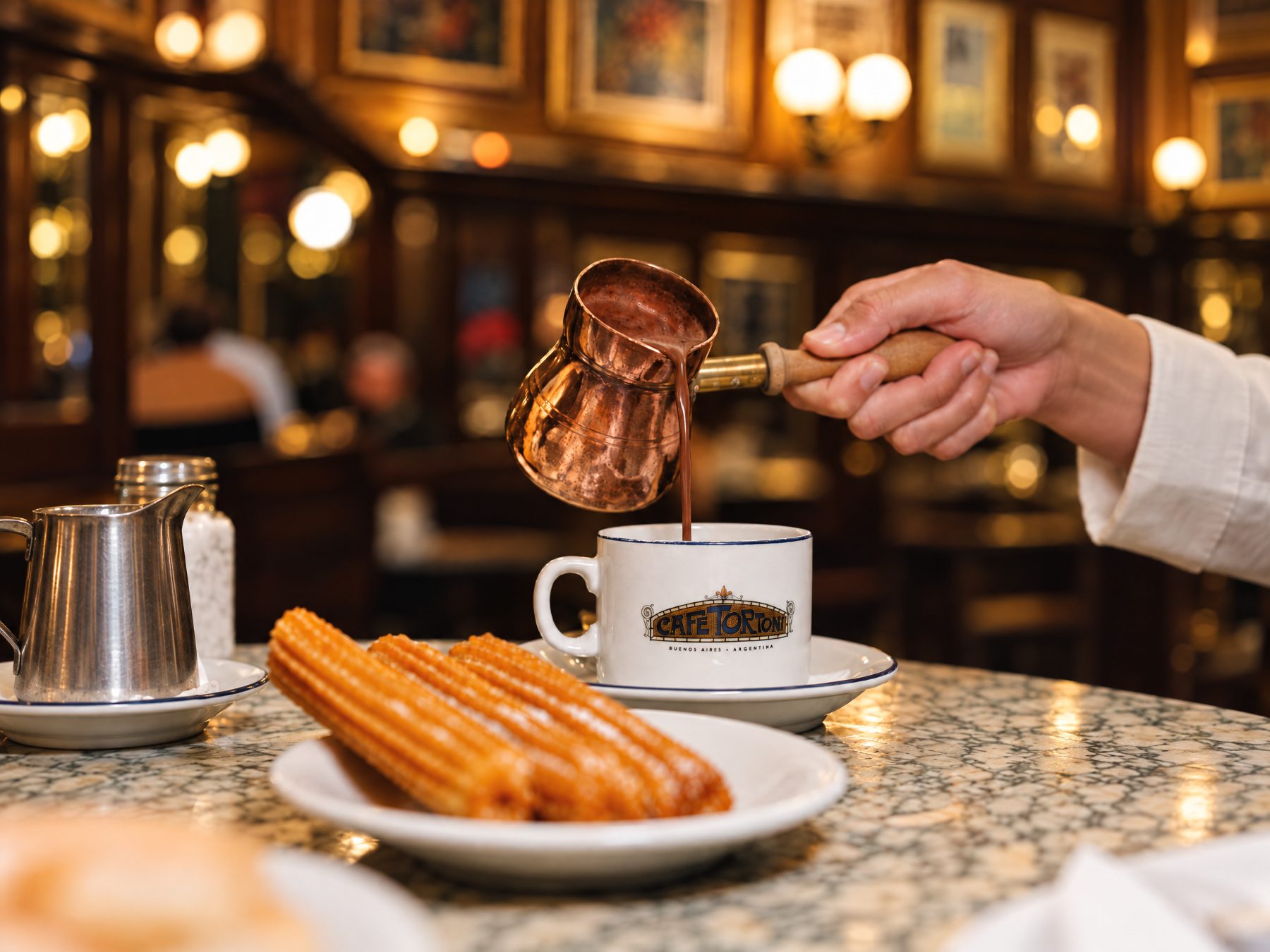
Act as Historical Archive Conservator and AI Restoration Specialist.

CONTEXT
Restoration of historical archival photographs of [Gran Café Tortoni c. 1900, Avenida de Mayo sidewalk, and literary gatherings of La Peña].

PRESERVATION DIRECTIVES:
- Objective: Restore original optical sharpness and tonal presence without modernizing or reinterpreting historical reality.
- Physical Cleanup: Eliminate scratches, chemical emulsion tears, fold creases, and scanning dust specks.
- Optical Definition: Enhance clarity in storefront signage, gas lamps, period attire, and architectural moldings while respecting the natural silver-halide photographic grain.
- Tonal Fidelity: Strictly preserve the original monochrome grayscale or sepia tint bath. Automatic colorization is strictly prohibited.
- Transparency Standard: Every restored asset must include metadata and visible caption attribution stating: "Archival photograph c. 1900 restored with generative AI".
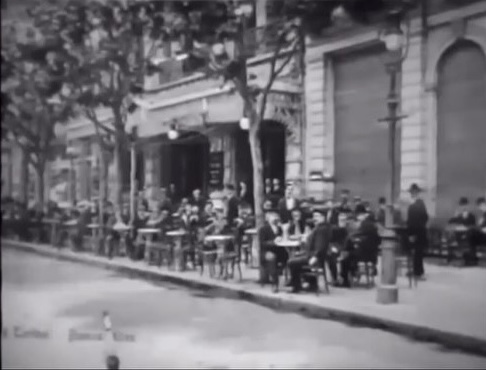
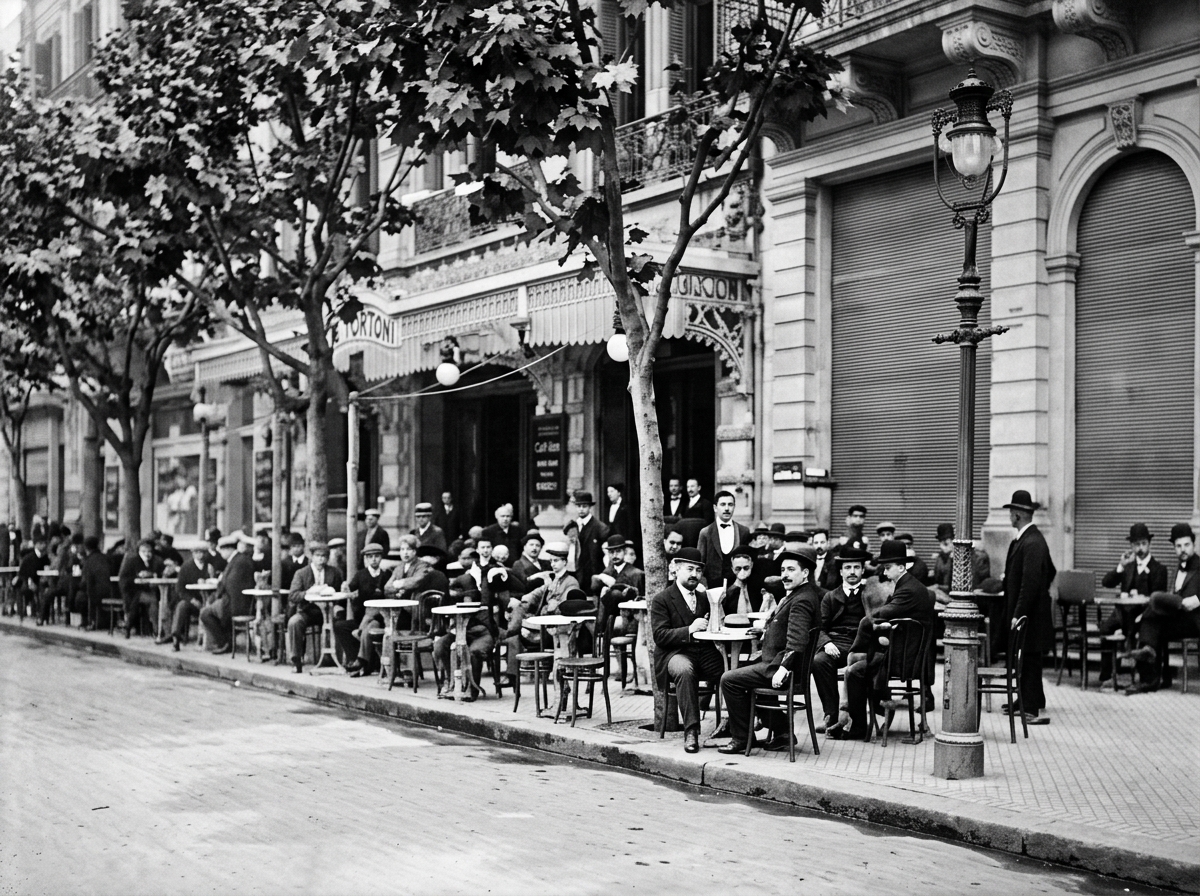
Archival c. 1900 vs. AI Restoration (MiniMax)
Drag the slider to contrast the damaged, grainy c. 1900 archival print against the AI restoration preserving authentic sepia tones.
Mobile Review Discovery: Single-Column Sticky Trap & Scrolling Ergonomics
Designing on wide desktop displays frequently masks usability defects that only surface when holding a smartphone in hand. During mobile testing (< 860px), our engineering audit uncovered two critical friction points and resulted in one deliberate architectural choice:
1. The Single-Column Sticky Trap (Text Overlap in Menu): On desktop viewports, category headers utilized position: sticky; top: 210px to accompany a two-column dish grid. When collapsed to a single column on mobile (< 860px), the sticky header remained frozen mid-screen while menu items and prices scrolled upward beneath it, creating unreadable overlapping text. We remediated this by resetting sticky positioning on mobile viewports (position: static !important; top: auto !important;), allowing headers to flow naturally with content.
2. Eliminating Lateral Carousel Friction (Native Vertical Stacking): The three primary cards on the homepage ("Menu, Tango, History") initially featured a horizontal scroll container (overflow-x: scroll). On mobile devices, lateral swiping interrupted natural downward thumb gestures. We transformed the container into a full-width vertical stack (flex-direction: column !important; width: 100% !important; gap: 36px !important;), presenting one full card and image at a time with effortless vertical readability.
3. Preserving the Horizontal Narrative Timeline: Unlike promotional cards, the historical timeline (1858 → Present) was retained as a horizontal visual track mapped to vertical page scrolling (data-hz-track with scroll-pinning). This creates an intentional, cinematic narrative pause as guests scroll down, advancing historical milestones without requiring awkward manual sideways swiping.
To systematically enforce these quality controls across every AI iteration, we added Prompt 8 to the production library:
Act as Lead Frontend Engineer specializing in Mobile UX and responsive CSS architecture.

CONTEXT
We are auditing the mobile viewport (< 860px) of [URL or web component].

PROBLEMS TO DETECT AND REMEDIATE
1. Single-Column Sticky Trap: Scan for elements using position: sticky inside containers or grids that collapse to a single column on mobile. If a category header remains pinned while child items scroll upward beneath it, it causes severe visual text overlap. On mobile breakpoints (< 860px), enforce position: static !important; and top: auto !important;.
2. Lateral Scroll Friction: Detect horizontal carousels or scroll tracks. On mobile, sideways swiping disrupts natural vertical thumb scrolling. Transform these containers into native vertical stacks (flex-direction: column !important; width: 100% !important;), stacking images and cards vertically with uniform gap spacing.
3. Cinematic Narrative Preservation: If an interactive historical timeline uses pinned horizontal scroll mapped to vertical page movement, preserve it with smooth translation and a 60 fps progress bar.

ACCEPTANCE CRITERIA
- Zero text overlap or sticky header collision during continuous downward scrolling.
- Fluid, natural vertical gesture flow without accidental horizontal page shifts.
- Desktop interactions (> 860px) remain completely untouched and intact.5. Image & AI Generative Pipeline
In rapid-turnaround digital engineering, scheduling an on-site commercial photo shoot with studio equipment can take weeks of administrative permits and substantial budgets. To overcome this constraint without sacrificing aesthetic excellence, we engineered a 3-stage visual asset pipeline:
Semantic Curatorship
We gathered public photographs of the salon, architectural details, monogrammed tableware, and archival prints from 1898–1930. Every asset was renamed according to its DOM component role (mesa-desayuno, vitral-central, fachada-marquesina), eliminating ambiguity during frontend development.
Batch 4:3 Standardization
Using Prompt 6, all images were normalized to a master 4:3 landscape ratio (≥2400 × 1800 px). Sensor noise and JPEG compression artifacts were removed while maintaining warm white balance evocative of afternoon sunlight filtered through leaded ceiling glass.
Archival Restoration with MiniMax
Historical photographs from the 1898 opening on Avenida de Mayo and gatherings of Alfonsina Storni and Benito Quinquela Martín suffered from emulsion decay. We utilized MiniMax to remove abrasions and restore signage legibility while preserving authentic silver-halide grain and sepia tones.
6. Before vs. After Impact Matrix: 8 Strategic Dimensions
| Business Dimension | Legacy Website (Joomla c. 2010) | Re-imagined System (2026 Edge) |
|---|---|---|
| 1. Time to Value Comprehension | Dense, unfocused institutional paragraphs; ~45s orientation time. | Under 3 seconds: Immediate value proposition: "Take a seat where Buenos Aires sat". |
| 2. Gastronomic Menu Consultation | Mandatory download of a 4.6 MB static binary PDF file. | Instant Web Catalog: 8 categories, instant search without accent sensitivity, celiac and vegetarian dietary filters. |
| 3. Smartphone Ergonomics | Scaled-down desktop view requiring continuous pinch-to-zoom. | Mobile-First UX: Persistent bottom dock with key actions (Menu, Tango, Visit) and touch targets ≥48px. |
| 4. Tango Show Reservations | Non-existent; required phone calls or paying 20%–35% agency commissions. | 3-Step Checkout Engine: Select show, choose tickets, instant confirmation with zero third-party fees. |
| 5. Sidewalk Queue Management | High uncertainty for tourists on Avenida de Mayo; 28% drop-off rate. | Live Operational Bar: Real-time hours, Subte Line A directions, and digital menu to anticipate seating orders. |
| 6. Performance & Page Speed | Bloated legacy scripts, unminified CSS, TTFB >1.8s, load times >6s. | Sub-second Load (<450ms) on 4G networks; 98+/100 Google Lighthouse score. |
| 7. Web Accessibility (WCAG 2.1) | Contrast ratios below 2.5:1; unindexed text trapped in raster images. | Strict WCAG AA Compliance: 5.7:1 to 10.6:1 contrast, keyboard navigation, and tabular figure numbers. |
| 8. Multi-Currency & Languages | Spanish-only text with static peso pricing lacking context. | Dynamic Switchers: Architecture for 5 languages (ES, EN, PT, FR, DE) and ARS/USD currency toggle. |
7. Five Key Engineering Takeaways: Software Engineering with AI
- Structured Content Must Precede Visual UI, Always: Attempting to design or code an interface before writing verified copy, validating business hours, and curating photographic assets is the fastest route to rework. Consolidating the master content document saved over 50% of development iterations. Design organizes information rather than merely decorating it.
- Visual Identity Is Not Invented: It Is Extracted from Architecture: The most disjointed redesigns of historic institutions occur when agencies impose generic startup tropes. By anchoring our design system in Christophersen's 1898 building, the interface feels authentic and unquestionable: it belongs to Gran Café Tortoni and nowhere else.
- Prompt Precision Relies on Architectural Constraints, Not Adjectives: Asking generative AI models to build something "elegant and modern" produces generic AI slop. True engineering quality emerges from concrete constraints: 60/30/10 proportional rule, minimum WCAG AA 4.5:1 contrast, tabular-nums font support, 48px touch targets, and zero third-party framework dependencies.
- Radical Source Honesty: Rigorously Tagging the Unverified: When engineering with AI, maintaining vigilance against hallucinations is paramount. If a price, schedule, or historical detail lacks direct institutional confirmation, the non-negotiable rule is to flag it with
[TO CONFIRM]. AI accelerates execution, but human engineering remains accountable for the truth. Furthermore, restored archival images carry explicit provenance captions, and as a conceptual proposal, reference assets would transition to dedicated commercial photography upon formal commissioning. - Transparency and Sovereign Software Delivery: The codebase was deliberately constructed in clean, sovereign web code (semantic HTML5, deterministic CSS, Vanilla JS) ready to be hosted on independent infrastructure or deployed across global edge networks like Cloudflare Pages, completely free of recurring monthly rental fees or closed-ecosystem lock-ins.

Doctor in Biological Sciences (PhD), researcher, and agentic systems architect. Co-founder of Imagine AI and founder of Padeler. She designs multi-agent orchestration protocols, deterministic design systems, and production AI architectures.
Looking to modernize your company's digital experience with this standard of engineering?
At Imagine AI, we design, build, and deploy high-performance sovereign software under a transparent single-fee investment model—with full source code ownership and zero monthly software rental fees.