
imagineAI demo: it was not made for Nico and it is not his official page. We used his public profile as an example because his brand is very clear on Instagram. His name, his photo and his book covers belong to their owners.
If you have a Linktree, it probably looks like everyone else's: a colored background, rounded white buttons, a list of links one under the other. It does its job, but it does not sound like you. In this article we show you how we built, in one hour and with a design AI, a link page with the colors, the lettering and the priority order of a real person. The three exact prompts are here, so you can copy them and swap in your own details.
Before and after
Nico Grupe is a personal development coach with close to a million followers on Instagram. His brand there is recognizable in a second: orange, cream paper, thick capital letters and a handwritten phrase. His Linktree, on the other hand, has the colors and shape of Linktree.
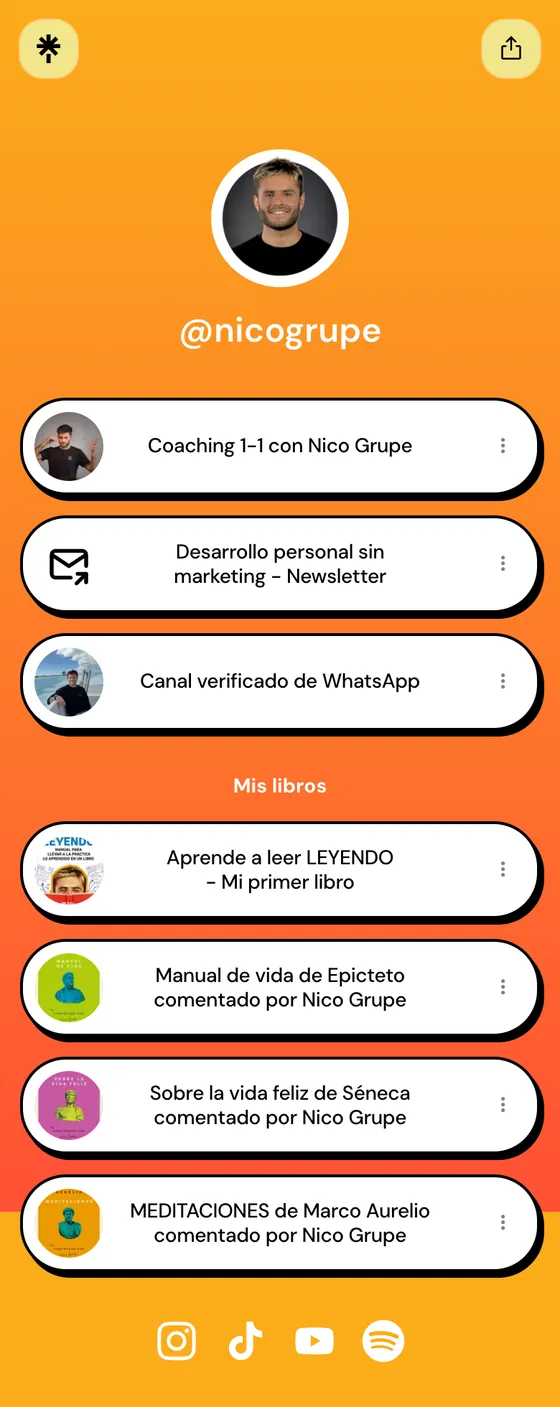
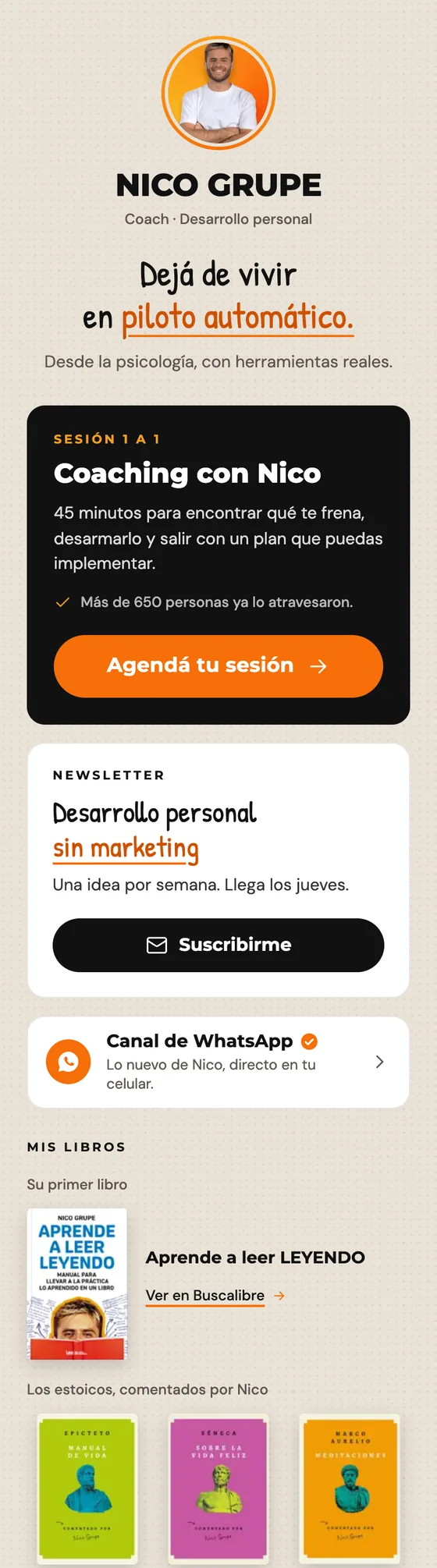
Three things change. What he sells moves to the top and looks different from the rest. The colors and the lettering come from his Instagram. And the four books stop being four buttons and become a single row of covers.
Step 1: the design system
A design system is a brand's style guide written so that a machine can read it: colors with their codes, typefaces, sizes, borders, how buttons look and how the brand speaks. If you give it to the AI before asking for a page, the page comes out with that identity and not with the one from a generic template.
What to attach before writing anything:
- Screenshots of 6 to 9 recent posts from his Instagram, in different formats (quote cards, reel covers, diagrams).
- His profile photo.
- The link to his website, which you pass inside the prompt so the AI visits it.
We tried this in Claude Design, Anthropic's tool that generates pages and shows them on screen so you can review them. This was the first prompt, word for word:
I want to build the personal design system of Nico Grupe, a popularizer of Stoic philosophy and personal development. This is an imagineAI demo: we are not doing it for him, it is an example of what can be done.

Go to his website, https://nicogrupe.com, and look at the Instagram screenshots I am attaching. Take his real style from there, without inventing a new one:
- A palette of 4 to 6 colors, with their codes and what each one is used for.
- Two Google Fonts typefaces, one for headings and one for body text, that resemble the ones he uses.
- Text sizes, spacing, borders and shadows.
- What the buttons, cards and links look like.
- The tone: how he writes and how he speaks to his community.

Show it to me on a page I can review, and also hand it over as a file I can save and give to the AI with every request.
What the AI extracted and from where
The key part of the prompt is the phrase "without inventing a new one". The AI measured the colors he already uses, without picking others. When his website and Instagram disagreed, Instagram won, because it is his main channel.
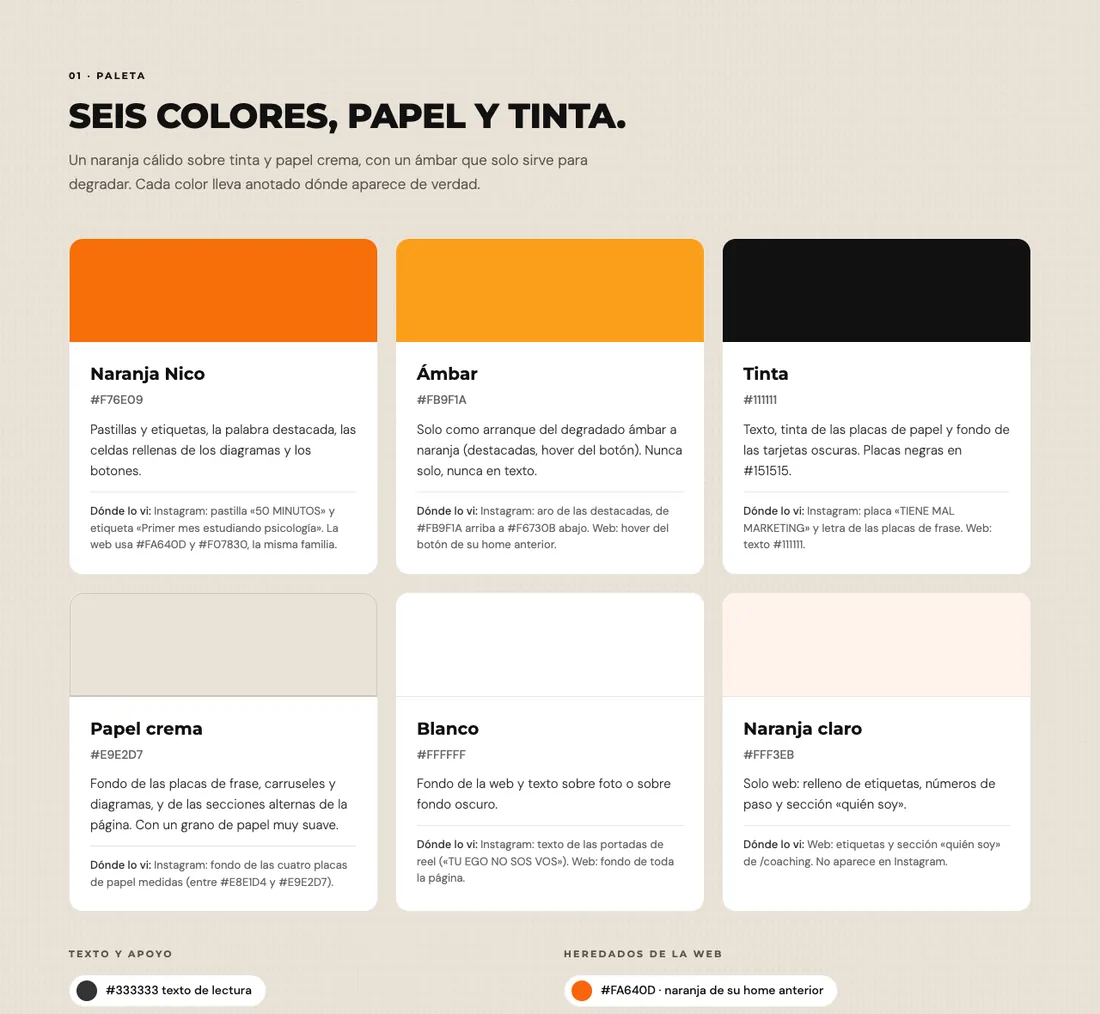
| Element | Value | Where it came from |
|---|---|---|
| Orange | #F76E09 | The "50 MINUTOS" tag on his reels and the labels on his covers |
| Cream paper | #E9E2D7 | The background of all his quote cards and diagrams |
| Ink | #111111 | The text on his cards and his dark panels. Almost black, never pure black |
| Amber | #FB9F1A | The gradient ring on his story highlights. Used only as the start of a gradient |
| Headings | Montserrat ExtraBold, in capitals | His reel covers ("TU EGO NO SOS VOS", meaning "your ego is not you"). It is the closest Google Font |
| Body text | DM Sans | The text on his coaching page |
| Handwritten phrases | Patrick Hand | The lettering on his quote cards. It is an approximation, since his real handwriting is not a font |
The AI also noted an accessibility detail that beginner designers rarely check: pure orange on a cream background is hard to read in small type. That is why the design system says orange goes on large lettering and buttons, and small text goes in ink.
At the end of this step you have a text file with all of this. You will paste it at the start of every following request.
Step 2: the link page
With the design system in hand, the second prompt asks for the page. Notice that the request carries a concrete order, link by link, with a reason behind each position.
Using Nico's design system, build his link page for mobile, in a single HTML file. It has to look like his brand and not like a generic Linktree.

Order the links by importance, instead of making them all identical one under the other:
1. At the very top, his photo, his name and a short phrase in his style.
2. The main thing, highlighted: 1-on-1 Coaching with Nico (https://nicogrupe.com/coaching).
3. The newsletter "Desarrollo personal sin marketing" (https://nicogrupe.kit.com/newsletter), with a clear subscribe button.
4. His verified WhatsApp channel (https://whatsapp.com/channel/0029Vb8th6F47Xe8JtPMKu0H).
5. "My books", in a row of covers: Aprende a leer LEYENDO (his first book), Manual de vida by Epictetus, Sobre la vida feliz by Seneca and Meditaciones by Marcus Aurelius, the last three annotated by Nico.
6. At the bottom, icons for his social networks: Instagram, TikTok, YouTube and his podcast on Spotify.

At the end of the page, add in small print: "imagineAI concept · demo, not Nico Grupe's official page".

It has to look perfect on a phone 390 px wide and load fast. No emojis: use icons.
The result is a single HTML file of about 34 KB. It opens on any phone, depends on no platform and has no monthly fee.
The new order
- Photo, name and a phrase. The phrase comes from his own Instagram: "Dejá de vivir en piloto automático" (stop living on autopilot).
- 1-on-1 coaching, on a large black card with the orange button.
- Newsletter, with a visible subscribe button.
- WhatsApp channel.
- The books, as a row of covers.
- Social networks, as icons at the bottom.
Why that order
Each ordering decision answers a marketing reason. There are four, and they hold for any link page.
One main action
Whoever arrives from Instagram has a few seconds. If all the buttons carry the same weight, they do not know where to start and they leave. What sells goes on top, and it looks different: here, the coaching.
Fewer options, more clicks
Seven identical buttons force people to read them all. Grouping the four books in a row leaves four blocks, and the person decides faster.
The newsletter is a contact you own
An Instagram follower depends on the algorithm. An email address is yours and the message arrives when you send it. That is why the newsletter goes second, with its button visible.
The same brand from end to end
From the reel to the page, the same colors and the same lettering. The person recognizes they are still in the right place, and that builds trust before they read anything.
Step 3: review
The AI gets small things wrong: a cut-off text, a button that runs off the screen, a badly copied link. The third prompt is short and asks it to correct itself:
Open it at phone size, check that nothing is cut off and that all the links work. Fix whatever you find.Then look at it yourself, on your phone and not only on the computer. Check every fact that appears on the page: if the AI added a figure, a time or a phrase your brand never said, remove it.
Publish it for free
The page is an HTML file, so any place that serves files will do. We use Cloudflare Pages, which has a free plan:
- Create a Cloudflare account and go to Workers & Pages.
- Click Create, choose Pages and then Upload assets.
- Give the project a name.
- Drag in the folder that contains your file. It has to be named
index.html. - Click Deploy. In a few seconds your page is live at
yourname.pages.dev.
If you prefer not to touch anything, you can also ask the AI to publish it for you.
The only thing you pay for is your own domain, if you want an address like yourname.com instead of .pages.dev. It is paid once a year.
Adapt it to your case
- Prompt 1: change the name, the description of the person and the website link. Attach screenshots of your own Instagram and your photo. Remove the "imagineAI demo" phrase.
- Prompt 2: replace the numbered list with your links, in the order that suits you. What you most want to sell goes first. Change the footer phrase or delete it.
- Prompt 3: works as it is.
- If you do not have an Instagram with a defined brand: attach your logo, your website or any piece of yours, and ask the AI to start from there.
Save this article, copy the three prompts and swap in your own details. With one hour and a good list of links ordered by importance, your page can sound like you.
Want us to build your link page, or your whole site, with your brand?
We design and build with AI, for a one-time payment and with the code in your hands.